Every repair job's real status, one WhatsApp message away.
Received, Diagnosing, Awaiting Approval, In Repair, Ready for Pickup: a real lifecycle for every dropped-off item, with an automatic WhatsApp update at each meaningful stage.
Example conversations. Business and job details are illustrative.
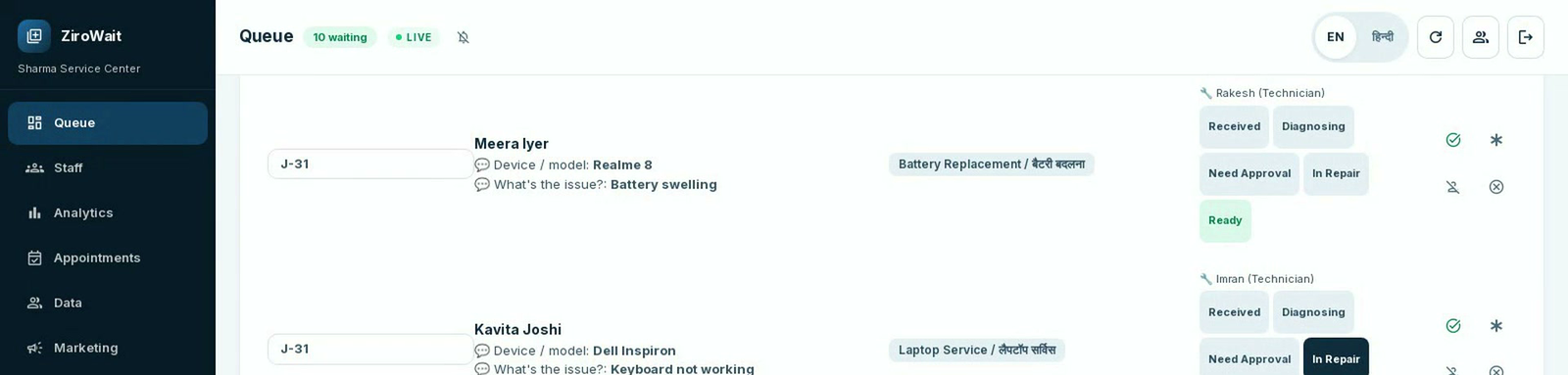
Built around how a repair actually moves.
A real 5-stage repair lifecycle
Received, Diagnosing, Awaiting Approval, In Repair, Ready for Pickup. One clear stage at a time, set by your staff.
The customer never has to call and ask
A WhatsApp update goes out automatically at every meaningful stage change, not a flood of messages, just the ones that matter.
"Ready for pickup" gets its own message
The moment that actually matters to the customer has a dedicated, clear confirmation, with your business name and token.
Jobs route to whoever's free
A new job goes automatically to whichever technician currently has the lightest active load. No manual dispatching.
Change the stage with one tap
Staff move a job forward from the dashboard, and the WhatsApp update goes out on its own.
Hindi and English
Every stage update goes out in the language the customer used.
Good things to ask first.
Will customers get spammed with messages?
No. Updates go out only at meaningful stages (diagnosing, awaiting approval, in repair, ready for pickup), not on every internal change.
How are jobs assigned to technicians?
By current load. Whichever technician has the fewest active jobs right now gets the next one. No manual dispatch needed.
Can staff skip or go back a stage?
Staff control the stage directly from the dashboard. It's a manual, deliberate action each time, not an automated timer.
Is the "awaiting approval" step automated?
No. A staff member marks it when they're genuinely waiting on the customer, and moves it forward once the customer replies.
Let's put your repair jobs on WhatsApp.
Tell us about your service center and we'll reply with the next steps.